1.接口描述
1.1.获取国标配置
GET请求:/LAPI/V1.0/Channels/0/System/ManagerServers
鉴权方式:Digest Auth
1.2.获取公钥信息
GET请求:/LAPI/V1.0/System/Security/RSA
鉴权方式:No Auth
1.3.设置国标配置
PUT请求:/LAPI/V1.0/Channels/0/System/ManagerServers
鉴权方式:Digest Auth
2.请求参数
2.1.设置国标配置
| 参数名称 | 参数类型 | 是否必选 | 描述 |
|
Num |
Int | 是 | 国标服务个数 |
|
ManagerServersList |
object[] | 是 | 国标服务配置列表 |
ManagerServersList[]
| 参数名称 | 参数类型 | 是否必选 | 描述 |
|
Index |
Int | 是 | 管理服务配置索引 |
|
MngProtocol |
Int | 否 | |
|
ProtocolVersion |
Int | 否 |
服务器通信协议版本 不带该字段默认为GB28181/T-2016 0:GB28181/T-2016 1:GB28181/T-2021 |
|
DeviceID |
String | 是 | 设备国标ID |
|
ServerID |
String | 是 | 服务器国标ID |
|
DeviceName |
String | 否 | 设备名称 |
|
Address |
String | 是 | SIP服务器地址 |
|
Port |
Int | 是 | SIP服务器端口 |
|
BackupServerID |
String | 否 | |
|
BackupAddress |
String | 否 | |
|
BackupPort |
Int | 否 | |
|
VideoChlID |
String | 否 | 视频输入国标ID |
|
VideoChl2ID |
String | 否 | 视频输入国标ID(双目IPC) |
|
AudioChlID |
String | 否 | 音频输入国标ID |
|
Expire |
Int | 是 | 注册有效期(秒) |
|
StreamType |
Int | 否 |
码流类型 不填默认自适应 0:自适应 1:主流 2:辅流 3:第三流 |
|
TransportProtocol |
Int | 否 |
SIP信令传输协议 不带该字段默认为UDP 0:UDP 1:TCP |
|
LocalPort |
Int | 是 |
本地服务端口号 不带该字段默认为5060 |
|
RSAPublicKey |
object | 是 |
公钥 |
|
RegPassword |
String | 是 |
注册密码 (1)获取时默认不携带该字段; (2)修改密码时必须携带该字段,该密码是根据输入参数的公钥进行RSA加密后再经过Base64编码后的字符串 |
RSAPublicKey{}
| 参数名称 | 参数类型 | 是否必选 | 描述 |
|
RSAPublicKeyE |
String | 是 |
RSA 公钥字段 E 字段 (1)十六进制数 (2)NVR设备需要将获取的该值(十进制)转换为十六进制 |
|
RSAPublicKeyN |
String | 是 |
RSA 公钥字段 N 字段 (1)十六进制数 |
3.返回参数
参数信息描述同上
4.示例
4.1.请求示例
4.1.1.获取国标配置
curl --location --request GET 'http://172.24.6.222/LAPI/V1.0/Channels/0/System/ManagerServers'4.1.2.获取公钥信息
curl --location --request GET 'http://172.24.6.222/LAPI/V1.0/System/Security/RSA'4.1.3.设置国标配置
curl --location --request PUT 'http://172.24.6.222/LAPI/V1.0/Channels/0/System/ManagerServers' \
--header 'Content-Type: application/json' \
--data-raw '{
    "Num": 2,
    "ManagerServersList": [
        {
            "Index": 0,
            "MngProtocol": 1,
            "ProtocolVersion": 0,
            "DeviceID": "11011100441327050018",
            "ServerID": "31000000002000000001",
            "DeviceName": "210235C69N3229000020",
            "Address": "101.227.46.100",
            "Port": 15060,
            "BackupServerID": "iccsid",
            "BackupAddress": "0.0.0.0",
            "BackupPort": 5063,
            "VideoChlID": "11011100441327050018",
            "VideoChl2ID": "",
            "AudioChlID": "11011100441327050018",
            "Expire": 3600,
            "StreamType": 1,
            "TransportProtocol": 1,
            "LocalPort": 5069,
            "RSAPublicKey": {
                "RSAPublicKeyE": "xxx",
                "RSAPublicKeyN": "xxx"
            },
            "RegPassword": "xxx"
        },
        {
            "Index": 1,
            "MngProtocol": 1,
            "ProtocolVersion": 0,
            "DeviceID": "11011100441327050019",
            "ServerID": "31000000002000000001",
            "DeviceName": "210235C69N3229000020",
            "Address": "101.227.46.102",
            "Port": 5063,
            "BackupServerID": "",
            "BackupAddress": "0.0.0.0",
            "BackupPort": 5060,
            "VideoChlID": "11011100441327050019",
            "VideoChl2ID": "",
            "AudioChlID": "11011100441327050019",
            "Expire": 3600,
            "StreamType": 0,
            "TransportProtocol": 0,
            "LocalPort": 5070
        }
    ]
}'
4.2.返回示例
4.2.1.获取国标配置
{
    "Response": {
        "ResponseURL": "/LAPI/V1.0/Channels/0/System/ManagerServers",
        "CreatedID": -1,
        "ResponseCode": 0,
        "SubResponseCode": 0,
        "ResponseString": "Succeed",
        "StatusCode": 0,
        "StatusString": "Succeed",
        "Data": {
            "Num": 2,
            "ManagerServersList": [
                {
                    "Index": 0,
                    "MngProtocol": 1,
                    "ProtocolVersion": 0,
                    "DeviceID": "11011100441327050018",
                    "ServerID": "31000000002000000001",
                    "DeviceName": "210235C69N3229000020",
                    "Address": "101.227.46.100",
                    "Port": 15060,
                    "BackupServerID": "iccsid",
                    "BackupAddress": "0.0.0.0",
                    "BackupPort": 5063,
                    "VideoChlID": "11011100441327050018",
                    "VideoChl2ID": "",
                    "AudioChlID": "11011100441327050018",
                    "Expire": 3600,
                    "StreamType": 1,
                    "TransportProtocol": 1,
                    "LocalPort": 5069
                },
                {
                    "Index": 1,
                    "MngProtocol": 1,
                    "ProtocolVersion": 0,
                    "DeviceID": "11011100441327050019",
                    "ServerID": "31000000002000000002",
                    "DeviceName": "210235C69N3229000020",
                    "Address": "101.227.46.102",
                    "Port": 5063,
                    "BackupServerID": "",
                    "BackupAddress": "0.0.0.0",
                    "BackupPort": 5060,
                    "VideoChlID": "11011100441327050019asasas",
                    "VideoChl2ID": "",
                    "AudioChlID": "11011100441327050019",
                    "Expire": 3600,
                    "StreamType": 0,
                    "TransportProtocol": 0,
                    "LocalPort": 5070
                }
            ]
        }
    }
}
4.2.2.获取公钥信息
{
    "Response": {
        "ResponseURL": "/LAPI/V1.0/System/Security/RSA",
        "CreatedID": -1,
        "ResponseCode": 0,
        "SubResponseCode": 0,
        "ResponseString": "Succeed",
        "StatusCode": 0,
        "StatusString": "Succeed",
        "Data": {
            "RSAPublicKeyE": "xxx",
            "RSAPublicKeyN": "xxx"
        }
    }
}
4.2.3.设置国标配置
{
    "Response": {
        "ResponseURL": "/LAPI/V1.0/Channels/0/System/ManagerServers",
        "CreatedID": -1,
        "ResponseCode": 0,
        "SubResponseCode": 0,
        "ResponseString": "Succeed",
        "StatusCode": 0,
        "StatusString": "Succeed",
        "Data": "null"
    }
}
5.注意事项
(1)由于设备重启后公钥信息会发生变化,所以在操作修改包含密码的国标配置信息时,需先获取一下公钥信息;
(2)当同个设备的多个国标服务器配置需要一起修改时,一般的,页面是不允许保存具有相同服务器ID的配置,但接口无影响。
6.其它
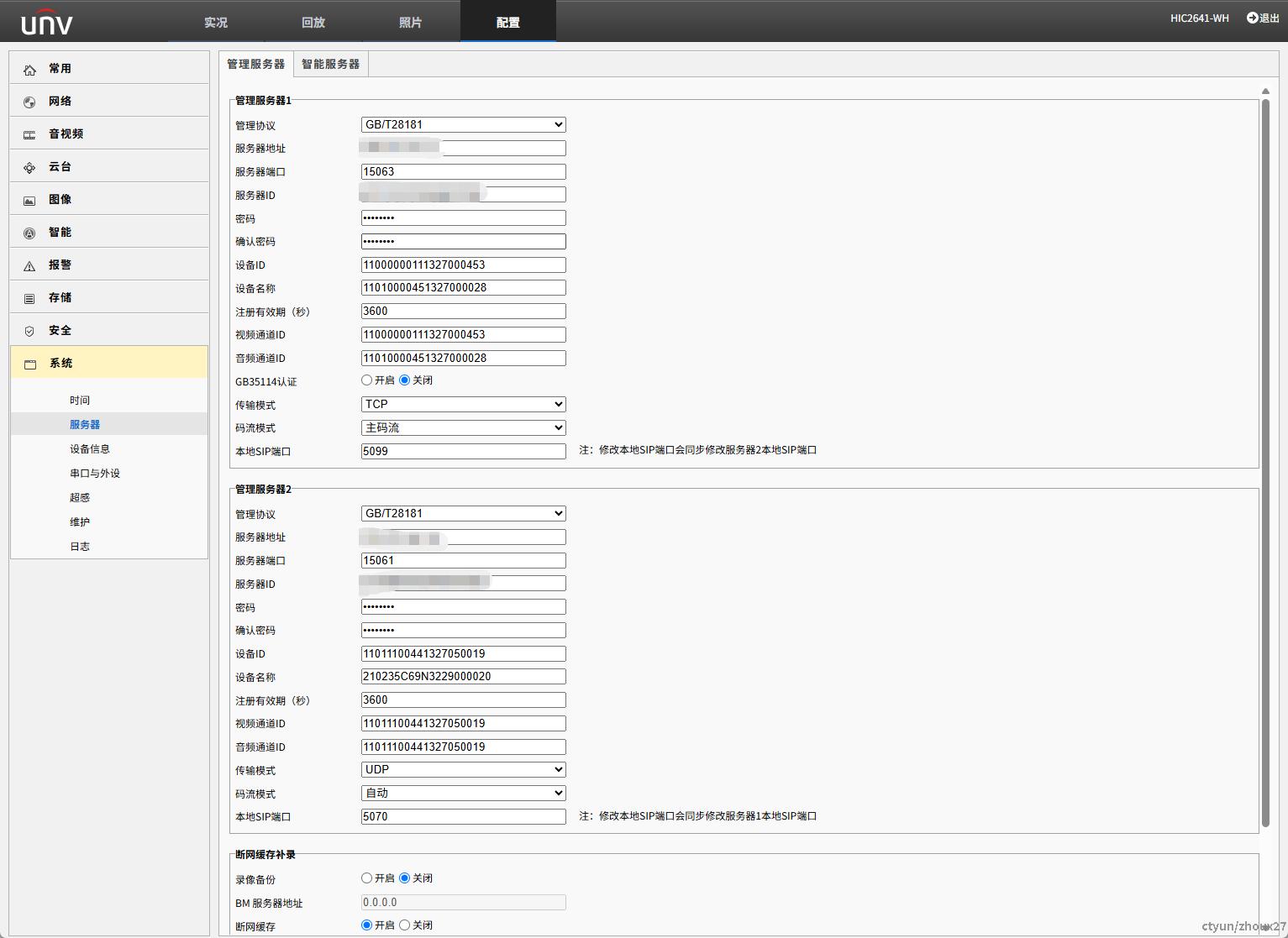
宇视设备国标配置信息界面: